
 Andreas Bartel
- August 27, 2025
Multi-Factor Authentication (MFA): Strengthening Login Security
In 2025, stolen passwords are still one of the biggest reasons for cyberattacks. Hackers use phishing, brute-force attacks, and data leaks to steal credentials. That’s why relying only on a username + password is no longer safe.
The solution? Multi-Factor Authentication (MFA).
________________________________________
• What is MFA?
Multi-Factor Authentication is a login method that requires two or more proofs of identity before granting access.
The factors usually come from three categories:
1. Something You Know → Password, PIN
2. Something You Have → Phone, Security Token
3. Something You Are → Fingerprint, Face ID
________________________________________
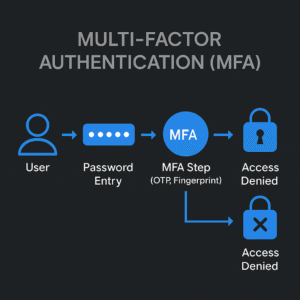
• How MFA Works (Step by Step)
1. User enters username + password.
2. System asks for a second factor (e.g., OTP on phone).
3. If both are correct → access is granted.
4. If second factor fails → login is denied.
________________________________________
• Technical Example: Enforcing MFA with Google Authenticator
For a Linux SSH server, you can enable MFA like this:
1. Install PAM module:
sudo apt-get install libpam-google-authenticator
2. Configure MFA for a user:
google-authenticator
This generates a QR code → scan with Google Authenticator app.
3. Update SSH config (/etc/pam.d/sshd):
auth required pam_google_authenticator.so
4. Restart SSH service:
sudo systemctl restart ssh
➡️ Now the user must enter password + OTP to log in.
________________________________________
• Technical Diagram: MFA Flow
User → (Password Entry) → MFA Step (OTP/Fingerprint) → System Access
• ✅ Correct factors → Access Granted
• ❌ Wrong factor → Access Denied
________________________________________
• Why MFA Matters in 2025
• Protects against stolen or weak passwords.
• Blocks phishing attempts (even if password is leaked).
• Required for compliance (GDPR, HIPAA, ISO, SOC2).
• Simple but powerful — easy to deploy across apps.
________________________________________
• Final ThoughtMFA is one of the easiest and most effective ways to improve security. If you’re not using it yet, you’re leaving the door open for attackers.
👉 At HackerXone, we’ll keep sharing practical security guides with real-world examples and diagrams to help you stay secure.